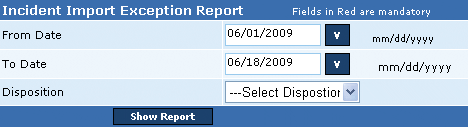
This Incident Exception report is the non-compliance report displaying false alarm details from non-permit holders or permit holders that are due for renewal. The user needs to generate this report by selecting the period and mentioning the alarm disposition type, False Alarm (FA) or Cancelled Alarm (CA). The false alarm details in the report include (1) Permit name, (2) Address, (3) Zip Code, (4) Service or Permit number, (5) Alarm type, (6) Date received, and (7) Disposition. In addition, the report displays the total number of reported non-compliant alarm types in for each Alarm Type. This report is generated in .PDF format.
Note: The report excludes the corrupted city data (other alarm types, fire, accident, and others).
Perform the following steps to generate the incident import exception report:
1. In the From Date box, enter the starting range of the period.
2. In the To Date box, enter the ending range of the period.
3. From the Disposition box, select the disposition type and click Show Report to generate the Incident Import Exception report.
Copyright 2000-2009 City of Houston Alarm Program