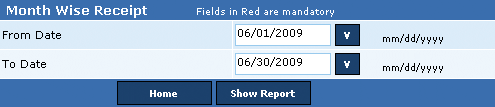
This report displays a monthly comparison of total billed amount in the selected period against the applied adjustment and the received payment. The report displays the bifurcation of the amount received in each future month and the pending amount. For instance, in February 2008, $190 was the total billed amount and in May 2009, PMAM received $170 and $20 in June 2009. In addition, the penalty for the bounced check is displayed against the Bill Adjustment column.
Additionally, a waiver applied against the bill is displayed in the Receipt Adjustment column.
Notes:
• The View History drop-down box stores all reports viewed in a single session. This is helpful while viewing reports of different years or months.
• Click the Export icon to export the displayed report in various formats that include (1) Crystal Report (RPT), (2) .PDF, (3) MS Word, (4) MS Excel (97 – 2000), (5) MS Excel 97 – 2000 (data only), and (6) .RTF.
• In the Go To box, enter the page number and click the Go To icon to view the required page.
Alternatively,
• Click the Navigation icons to browse through the report pages.
• The Navigation icons are disabled, if the report has less than two pages.
• From the Zoom box, select the zoom percentage to zoom in and zoom out the displayed report.
Perform the following steps to generate the month wise report:
1. In the From Date box, enter the start date of the period.
2. In the To Date box, enter the start date of the period and click Show Report to generate the Month Wise report.
Copyright 2000-2009 City of Houston Alarm Program