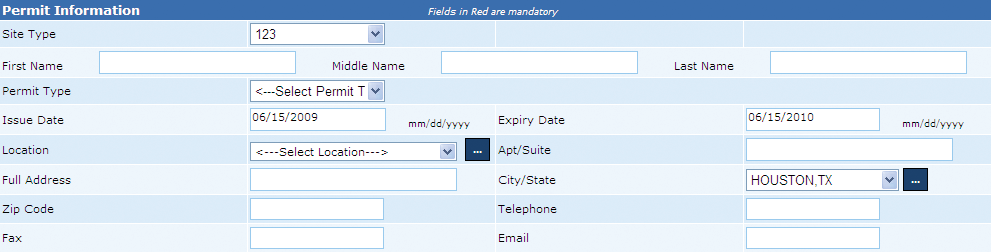
This is the permit registration page, which helps the user to create new active and inactive false alarm permits for citizens of a city.
Note: Fields in Red are mandatory.
Permit Information
This section enables the user to enter a citizen’s personal details that include (1) Site type, (2) Permit type, (3) Name, (4), Location, and (5) Full address. Site type can be defined as the place where the alarm permit needs to be installed. The values for site type can be Exempt, Residential, Commercial or Government. In addition, permit type field allows user to select the type of alarm permit, which can be Burglar and Panic/Holdup.
Notes:
1. As the user selects the Site Type as Residential, it is mandatory for the user to mention the citizen’s first name and last name.
2. It is mandatory for the user to enter and validate the location field.
Perform the following steps to enter the permit information:
1. From the Site Type box, select the site type.
2. In the Location box, enter the site location and click Validate Location to check the authenticity of the location.
Billing Information

This section seeks the user to enter the citizen’s billing address. The user can select the Same as Permit Information check box to ensure billing and permit address is same for the permit holder.
Type of Alarm and Alarm Company Information
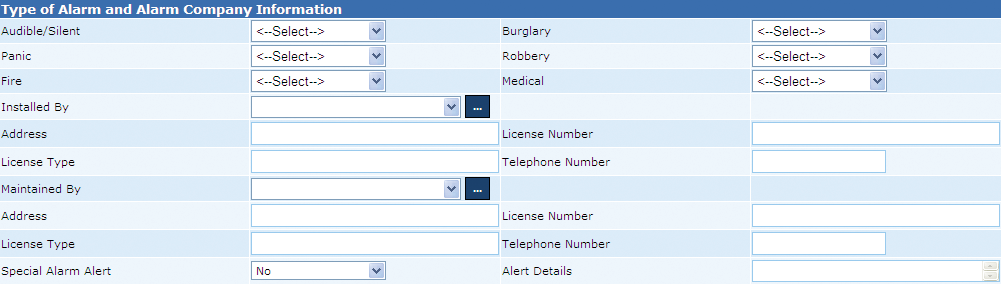
The alarm and alarm company information includes (1) alarm type (audible or silent) (2) types of subscribed alarm, Burglary, Panic, Fire, Medical, and Robbery, (3) Alarm company address, (4) License details, (5) Organization responsible for maintaining the alarm, (6) Assigned organization to install the alarm, and (7) Alarm alert details.
Notes:
• Audible alarms trigger the siren to notify the Concerned Department and the False Alarm website.
• Silent alarms only notify the Concerned Police Department.
Permit Holder Information
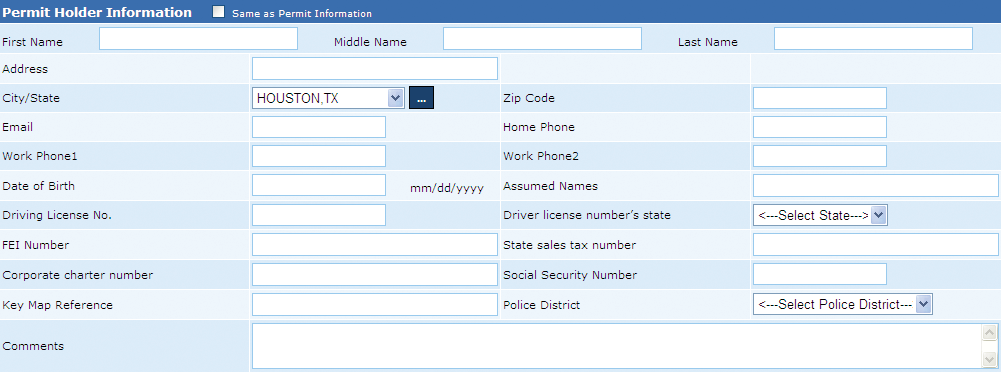
The section enables the user to enter to enter the personal contact information for the citizen.
A permit holder is responsible for maintaining premises, alarm system operations, and paying assessed service fees or fines. For a residential alarm, head of the household or any responsible adult can be the permit holder and for a business alarm, this responsibility can be handled by the owner, manager, security director, building manager, or any responsible individual designated by the owner.
The user can select the Same as Permit Information check box to utilize the same information as mentioned in the Permit Information section.
Contact Persons

This section allows the user to add contact details of an individual to be contacted during an emergency and is able to reach the location within 20 minutes when required by the Police Department. The individual’s details include (1) Name, (2) Address, (3) Contact numbers, and (4) Email address.
The contact person should meet the following criteria:
• Is always available to answer the alarm and respond to police department calls.
• This individual must have access to the building and the alarm.
• Is equipped to deactivate or repair any malfunctioning in the alarm system and provide security to the building.
• A contact person can be a close neighbor, friend, or relative - or a alarm company representative (in case the alarm company is willing to send someone with the required criteria).
• The system allows the citizen to add one or more contact persons and all must match the criteria and would have the same authority.
Note: It is essential for the user to add a minimum of one contact person.
Perform the following step to add a contact person:
• In the Contact Persons fields, enter the required values and click the Add button to add the contact person’s details.
Special Medical Concerns and Pet Information

This section seeks the user to specify all medical concern and pet details in the alarm site. This information would help the police department in preparing the rescue operation in the advent of burglary, panic, or any other incident reported via the installed alarm.
Permit Holder, Non – Permit Holder, and Notes

A permit holder can be an individual or an organization that agrees to FAMS and the city’s police department’s terms
and conditions and is responsible for the registered alarm system. On the other hand, a non-permit holder possesses an unregistered alarm system and the system creates a dummy permit for such citizens. Locations with an unregistered alarm system are considered as non-compliant by the city’s police department.
The Notes field enables the user to mention any important information about the permit holder or the alarm site. As a user enters a note, the system automatically updates the date and time in the Date field.
Copyright 2000-2009 City of Houston Alarm Program