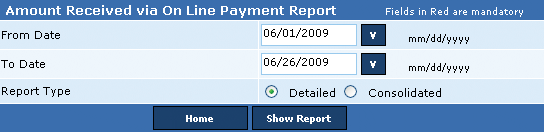
Citizens can make an online payment for their monthly false alarm bills and are charged a Convenience fee of $1.50 over the outstanding amount. This report displays receipt details for all online payments in the selected period. The user can generate this report in both detailed and consolidated form. The detailed report includes (1) Serial number, (2) Permit number, (3) Permit name, (4) Transaction number, (5) Bill number, (6) Receipt ID, (7) Receipt date, (8) Receipt amount, (9) Total payment received, (10) Charges, (11) Total Payment received, (12) Total payment received against bills, and (13) Total Convenience fees charged.
The Consolidated report excludes the bill number and receipt id.
Notes:
• Total Payment Received against bills = Total payment received + Total Convenience fees charged.
• Total Convenience fees charged = Total Payment Received against bills – Total payment received.
Perform the following steps to generate the amount received via online payment:
1. In the From Date box, enter the starting range of the period.
2. In the To Date box, enter the ending range of the period.
3. From the Report Type, click Detailed and then click the Show Report button to display the detailed Amount Received Via Online Payment report.
OR,
3. From the Report Type, click Consolidated and then click the Show Report button to display the
consolidated Amount Received Via Online Payment report.
Related Links
Copyright 2000-2009 City of Houston Alarm Program