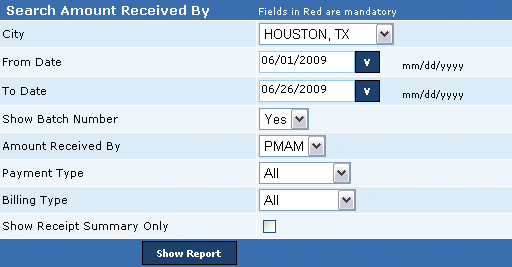
This report displays receipt details for all payments received by PMAM or Police department or both in the selected period. The details in the report include (1) Receipt date, (2) Serial number, (3) Permit number, (4) Permit name, (5) Bill number, (6) Receipt number, (7) Receipt amount, (8) Receipt paid by or the Payment type, (9) Receipt date, (10) Batch number, (11) Receipt received by, and (12) Payment summary for each permit number. Additionally, the user can generate this report by excluding batch number and receipt summary details. This report summarizes all receipt details at the end of the report and includes (1) Total number of receipts and its amount, (2) Total number of post confirmatory bills and its amount, and (3) Total actual bills and amount.
Post confirmatory bill amount is the advance payment received for the first month by new permit holders. This payment is received before bills are generated by the system.
The Receipt Summary for each permit displays the payment received against the selected billing type, Permit and Alarm charges with the corresponding payment type, Check, Credit Card or Cash. In addition, the summary displays the total amount received against each billing type via all payment types, total amount received via each payment type, and the total amount from all billing and payment types. Table 1 displays an example for Receipt Summary.
Perform the following steps to generate the payment received reports:
1. From the City drop-down box, select the city.
2. In the From Date box, enter the starting range for the period.
3. In the To Date box, enter the ending range for the period.
4. From the Show Batch Number drop-down box, select the option whether the batch number should be displayed in the report.
5. From the Amount Received By drop-down box, select the payment recipient.
6. From the Payment Type drop-down box, select the payment type.
7. From the Billing Type drop-down box, select the billing type.
8. Select the Show Receipt Summary Only check box to display the receipt summary in the report.
Related Links
• Amount Received Via Online Payment Report
Copyright 2000-2009 City of Houston Alarm Program