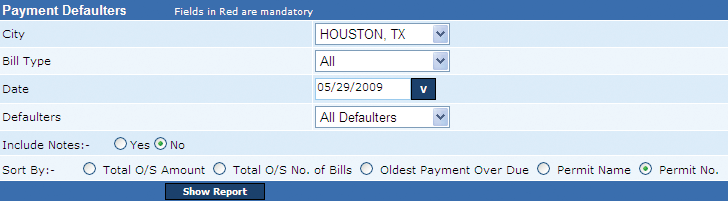
This report lists all payment defaulters for the selected period.
The various details in the report include (1) Permit holder’s name, (2) Total outstanding amount, (3) Number of due bills, (4) Oldest payment due days (Due Date), (5) Telephone, (6) Permit status, (7) Outstanding amount for False alarms, and (8) Outstanding amount for Renewals.
A user can generate a distinct report for the two bill types, False Alarm and Renewal. In addition to defaulters, a user can generate this report for all permit violators in the mentioned period. Furthermore, a user can view the previously entered notes and sort the report values as per (1) total outstanding amount, (2) total outstanding number of bills, (3) oldest payment over due, (4) permit name, and (5) permit number. This report is generated in the .PDF format.
Note: The system exempts all bills with due date in the last 45 days of the mentioned period. For instance, if a user enters the period as April 1, 2009, all bills with due date from Feb 14, 2009 to March 31, 2009 will be exempted.
Perform the following steps to generate the payment defaulters report:
1. From the City drop-down box, select the city.
2. From the Bill Type drop-down box, select the bill type.
3. In the Date box, enter the date.
4. From the Defaulters drop-down box, select the defaulter type.
5. In the Include Notes section, click Yes to include notes in the report.
Alternatively,
5. In the Include Notes section, click No to generate the report without notes.
6. In the Sort By section, click the option by which the report should be sorted and click Show Report to generate the Payment Defaulters report.
Related Links
Copyright 2000-2009 City of Houston Alarm Program