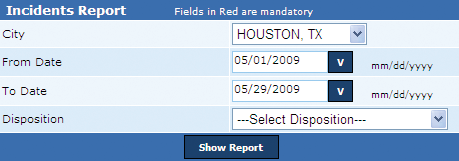
The Incidents report is an important tool for users to be acquainted with permit details of all false alarm incidents reported in the specified period. The report displays details that include (1) Permit number, (2) Permit name, (3) Service number, (4) Date, (5) Alarm type, and (6) Disposition. This report is generated in the .PDF format.
Note: Disposition is the term used to mention whether the reported incident is a false or cancelled alarm.
Perform the following steps to generate the incidents report:
1. From the City drop-down box, select the city name.
2. In the From Date box, enter the starting range of the period.
3. In the To Date box, enter the ending range of the period.
4. From the Disposition box, select the disposition type and click Show Report to generate the Incidents report.
Related Links
Copyright 2000-2009 City of Houston Alarm Program