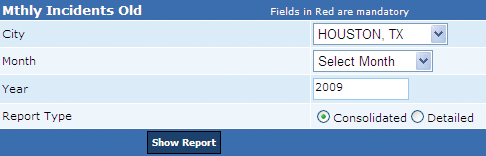
This report displays matched and unmatched false alarm incidents reported to the city’s police department in the selected month of a year.
Matched incidents can be termed as active permit incidents and unmatched ones are inactive permit incidents. The system enables a user to generate a consolidated and detailed report of the monthly reported incidents.
Consolidated report displays (1) Serial number, (2) Permit number, and (3) the service number of each incident for the permit. The serial number and permit number fields are aligned horizontally followed by digits 1 to 10. The permit number and the corresponding service number for each incident is placed horizontally in the below row. For instance, for Permit Number 12345, the service number of the first incident will be placed below 1.
In addition to the consolidated report, the Detailed report displays the incident details that include (1) Permit Name, (2) Serial number, (2) Service number, (3) Alarm type, (4) Date received, (5) Whether the false alarm should be charged?, (6) Total incidents for the month, (7) Total billable incidents for the month, and (8) Billable amount.
At the end of the report, a user can view the sum of matched and unmatched incidents reported in the month. This report is generated in the .PDF format.
Perform the following steps to generate the monthly incidents report:
1. From the City drop-down box, select the city name.
2. From the Month drop-down box, select the month.
3. In the Year box, enter the year.
4. From the Report Type section, click Consolidated and click the Show Report button to generate the Consolidated Monthly Incidents report.
Alternatively,
4. From the Report Type section, click Detailed and click the Show Report button to generate the Detailed Monthly Incidents report.
Related Links
• Incidents - Week Wise report
Copyright 2000-2009 City of Houston Alarm Program